How to register a new approval team
This guide provides step-by-step instructions to register a new approval team in LinkFlow Sistemas.
📌 Target audience: Administrator users responsible for registration and management on the platform.
Interactive Guide
1. Access the system
- Access the system through the link app.linkflow.com.br
- Log in with your email and password.
2. Access the Administrator module
- In the left sidebar menu, click on Administrator
- Access the Approval Team tab
3. Start registration
- Click the Approval Team button
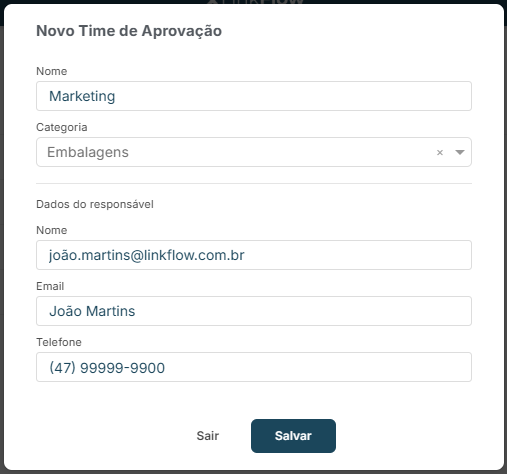
4. Fill in the data
-
Fill in the fields:
- Name
- Category (optional)
-
Then enter the responsible person details:
- Name
- Phone
-
Set permissions according to the user's profile
-
Click Save
Conclusion
Done! Now you know how to register a new Approval Team in LinkFlow.
If you have questions, consult support or the other manuals.